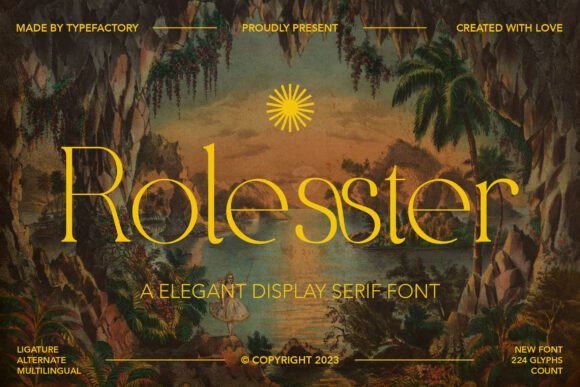
Rolesster: A Stylish Serif Font for Web Design
While working on a boutique online store project, I was looking for a font that could bring a sense of sophistication and timeless appeal to the site's visual identity. Rolesster caught my eye with its elegant curves and distinctive serifs, making it a perfect fit for the brand’s aesthetic.
Rolesster is a display serif font that exudes a refined and luxurious feel. Its carefully crafted strokes and unique serifs give it a distinct personality, ideal for creating visual interest in digital layouts. The font feels both modern and classic, offering a versatile option for web designers who want to elevate their typography without sacrificing readability.
Testing Rolesster in Real-World Layouts
I first tested Rolesster in the hero section of the online store, where it served as the main headline. The font added a touch of elegance that complemented the minimalist design of the page. It stood out against the background while maintaining a clean and professional look.
On mobile devices, I noticed that the font remained legible even at smaller sizes. The serifs helped guide the eye smoothly across the text, making it easier for users to scan the content. This made me confident in using it for headings and short phrases throughout the site.
Using Rolesster in Digital Branding
For the product landing page, I used Rolesster as the primary heading for each product section. The font's character made it easy to distinguish between different categories while keeping the overall design cohesive. It worked well with the brand's color palette and imagery, reinforcing the premium feel of the products.
I also experimented with using Rolesster for the site’s call-to-action buttons. While it looked great in larger sizes, I found that it wasn’t the best choice for small buttons due to the fine details in the letters. Instead, I opted for a simpler sans serif font for the button text, pairing it with Rolesster for the surrounding copy.
Readability and User Experience
One of the key considerations when choosing a font is how it performs across different screen sizes and backgrounds. Rolesster maintained good readability on both light and dark backgrounds, though I noticed that it looked slightly more refined on light backgrounds. On image overlays, the font still held up well, especially when used in a contrasting color.
For mobile layouts, I made sure to use appropriate font sizes and spacing to ensure that the text was easy to read. Rolesster’s structure allowed it to scale effectively, which is essential for responsive design. I also paid attention to line height and letter spacing to prevent any crowding that might affect user experience.
Font Pairing and Design Integration
When integrating Rolesster into the site, I paired it with a simple sans serif font for body text. This contrast created a balanced look, allowing the display font to shine without overwhelming the reader. The combination worked well for blog headers, product descriptions, and other textual elements.
I also considered how Rolesster would work in different design contexts. For instance, on a coaching website, it provided a polished look for section headings and testimonials. On a portfolio homepage, it added a touch of class to the project titles and navigation menu.
Practical Tips for Using Rolesster
If you're planning to use Rolesster in your next project, start by testing it in different areas of your layout. Use it for headlines, banners, and decorative elements where it can make the most impact. Avoid using it for long paragraphs, as it may not be as comfortable for extended reading.
Before implementing Rolesster on your site, check the available styles, weights, and file formats. Make sure the font includes multilingual support if needed, and verify the licensing terms for commercial use. These details are crucial for ensuring that the font works seamlessly across all platforms and devices.
Overall, Rolesster is a powerful tool for web designers looking to add a touch of sophistication to their digital projects. Whether you're building a boutique online store, a coaching website, or a creative portfolio, this font offers a stylish and effective way to enhance your brand's visual identity.
Its blend of elegance and functionality makes it a valuable addition to any designer's toolkit. With careful consideration of layout, pairing, and readability, Rolesster can help create a more polished and engaging online experience for your audience.